Classic 08 / 1981
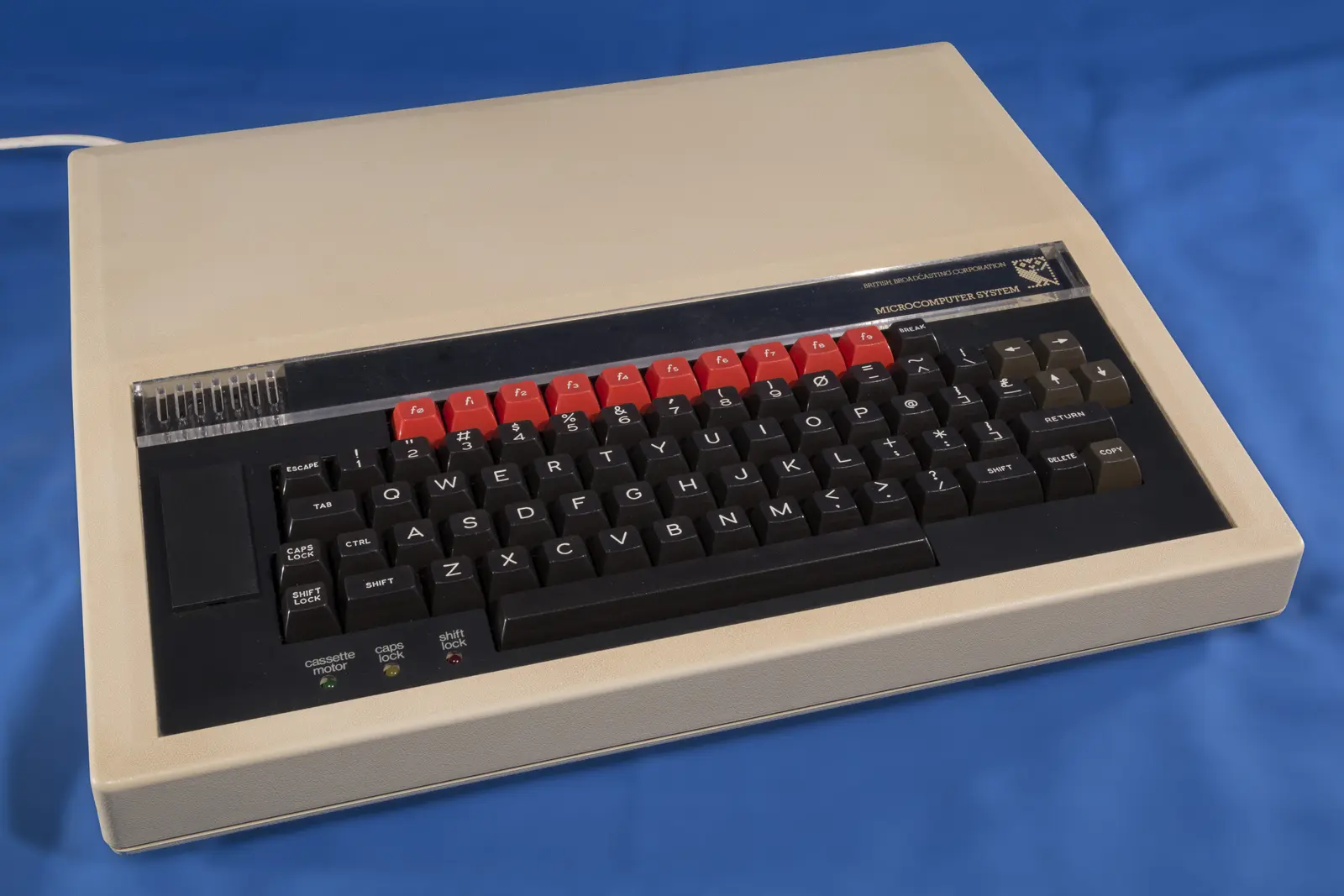
BBC Micro Model B:
the computer that taught a nation to program
A broadcaster wanted to prepare Britain for the computer revolution. Acorn rapidly built an exceptionally robust and expandable machine—and the “Beeb” became the digital heart of thousands of classrooms.
01 / A broadcaster with a mission
The BBC wanted to make computers understandable
At the start of the 1980s, the microcomputer seemed poised to transform work, education and everyday life. The BBC decided not merely to report that development, but to prepare the public for it.
The Computer Literacy Project combined television programmes with books, courses, advice and software. In The Computer Programme, viewers saw not only what a computer was, but how to write instructions and programs for one themselves.
The BBC needed one recognisable computer capable of covering every subject in the series. Its requirements were broad: text, colour graphics, sound, interfaces for experiments, a good programming language and room for future expansion.
The broadcaster did not design the machine itself. Young Cambridge company Acorn Computers won the commission. The BBC name on the case gave the computer authority; Acorn's engineering made it far more ambitious than a simple teaching machine.
02 / The prototype race
Acorn's Proton became the BBC Micro
Acorn was already working on an Atom successor under the codename Proton. When the BBC published its specification, a small team had to bring the design to life at remarkable speed.
Sophie Wilson, Steve Furber and their colleagues built and tested a prototype as the deadline approached. The story of the team working through the night became part of Acorn legend, but the engineering mattered more: Proton not only met the requirements, it showed how far a carefully designed 6502 computer could go.
The BBC Micro appeared in two versions. Model A had 16 KB of RAM and fewer interfaces; Model B offered 32 KB and the full complement. The more expensive B became the practical standard. Much software used its additional memory, so the gap between entry model and complete machine quickly grew.
03 / Built for intensive use
A keyboard capable of surviving a classroom
The BBC Micro cost more than many British contemporaries, but it felt different too. Its large case, substantial power supply and full-travel keys made clear that Acorn had not built a disposable machine.
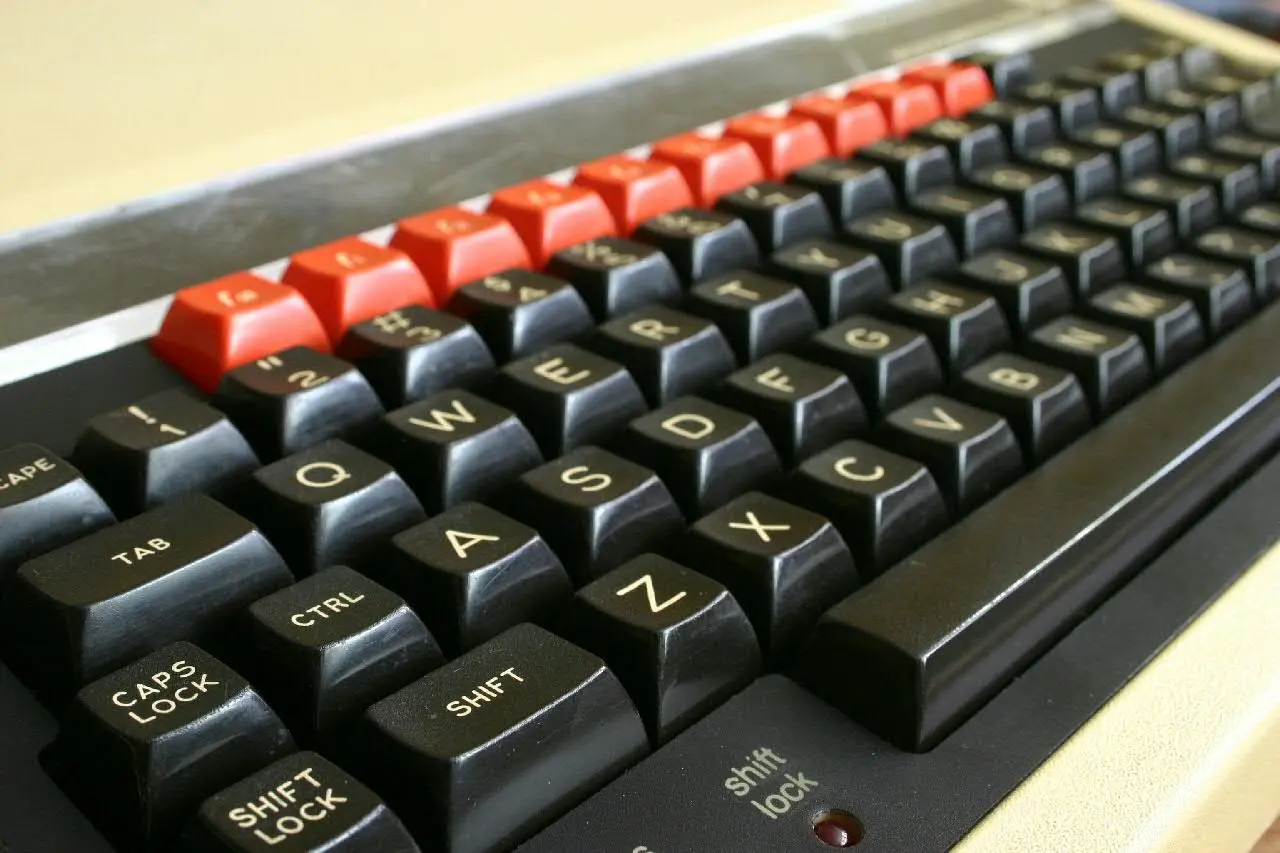
The striking f0 to f9 row could be assigned by software and gave the businesslike case a distinctive face.
A transparent strip above the keyboard accepted cards listing shortcuts. Each software package could therefore explain its own function keys. The four cursor keys stood separately, and the keyboard had the feel needed for both programming and word processing.
The robust construction suited schools, where dozens of pupils used the same machine. Inside, it was logically arranged and could accept ROM chips, a disk interface, speech or networking hardware. The BBC Micro was not a sealed appliance but a platform.
04 / An ambitious BASIC
BBC BASIC grew with the programmer
- 01
Start clearly
Line numbers and immediate commands made the first steps familiar. The machine powered on directly into a BASIC prompt.
- 02
Work structurally
Procedures, functions and loops such as
REPEATandUNTILhelped larger programs remain comprehensible. - 03
Move into machine code
A built-in assembler let advanced users write fast 6502 routines without leaving the familiar BASIC environment.
05 / Eight ways to view the same screen
Resolution, colour and memory had to be traded
The MODE command selected how the display was built. High resolution delivered sharp text or lines but consumed much of the 32 KB of RAM. More colours usually meant fewer pixels.
Mode 0 offered up to 640 × 256 pixels in two colours. Mode 2 was coarser but more colourful. Mode 7 used a separate teletext chip and required very little screen memory. That left more RAM for a program—ideal for information displays, text and educational software.
The sound chip provided three tone channels and one noise channel. This was enough for melodies, effects and simple harmony. Programmers could control graphics and sound from BASIC, while the fastest games spoke directly to the hardware.
06 / Almost nothing offered more connections
The back resembled a small laboratory
Acorn took the educational commission literally. The BBC Micro had to do more than display information: it needed to measure, control, communicate and grow.
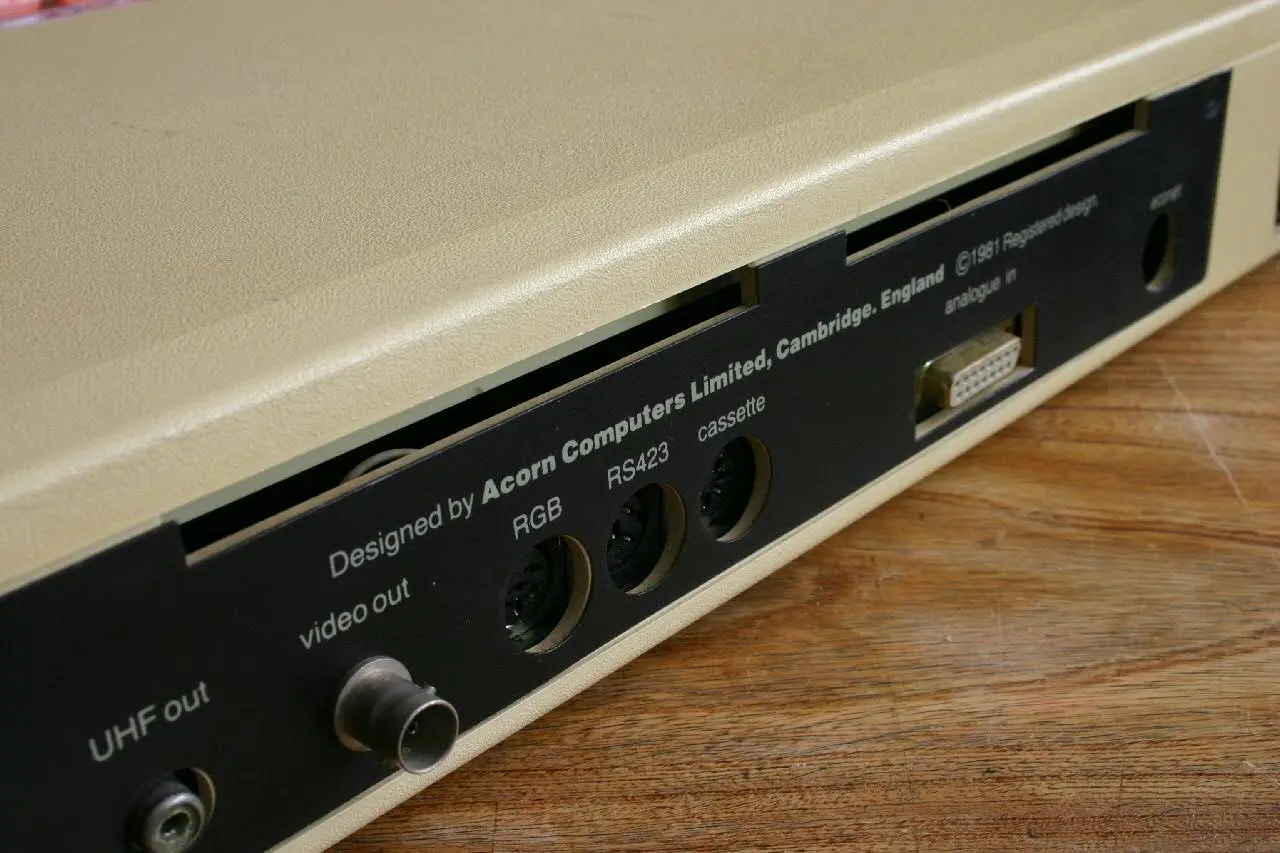
Video, cassette, serial, analogue and Econet sockets sat at the back; printer, user, 1MHz and Tube ports were underneath.
A television, composite monitor or RGB display could connect directly. There were also sockets for cassette, printer, RS-423 serial communication, analogue joysticks or sensors and a freely programmable user port. The 1MHz bus accommodated external expansions.
The most unusual connection was the Tube. A second processor performed intensive computation while the BBC Micro's 6502 continued to manage graphics, keyboard and peripherals. Additional 6502 and Z80 systems were among the options. The concept made the machine extraordinarily adaptable.
07 / Network, lesson and game
The school computer became a play world too
The BBC Micro truly came into its own in the classroom. Econet allowed several machines to share files and a printer through a central server.
Pupils could save their work without a costly disk drive beside every computer. Teachers could distribute software centrally. Programs such as Granny's Garden showed that educational software need not consist only of sums and spelling, but could also use narrative and discovery.
At home and after school, the same computer became a games machine. Chuckie Egg, Repton and numerous Acornsoft titles earned a permanent place in British memory. The high point was 1984's Elite. David Braben and Ian Bell built a three-dimensional galaxy around trade, combat and freedom—a vast world that seemed to escape the limits of its host.
Meanwhile, the BBC combined the computer with broadcasts, books and software. Programming therefore entered schools not as an isolated product, but as a complete culture of explanation, experiment and trying again.
08 / From Beeb to Arm
A school computer with an unexpectedly long shadow
The BBC Micro was superseded, but its knowledge, people and idea of expansion travelled much further.
Models A and B arrive
The 32KB Model B becomes the popular, fully equipped version of Acorn's BBC computer.
The Computer Programme
Television, books and the BBC Micro teach a broad audience what programming can mean.
Acorn Electron
A cheaper home version attempts to bring some BBC technology to a wider public.
Elite
The open-ended space game proves how much world can fit inside 32 KB.
ARM1 works as a coprocessor
Acorn's first RISC processor is connected to a BBC Micro through the Tube and tested.
BBC Master 128
More memory and built-in expansions make the successor better suited to the mature educational platform.
09 / Sources & further reading
Explore further
- BBC Computer Literacy Project Archive — history of the project
- Science Museum Group — BBC Microcomputer System
- Acorn/BBC — original BBC Micro user guides
- Centre for Computing History — Elite for the BBC Micro
- Arm — from Acorn and the BBC Micro to ARM1
Image credits
- BBC Micro Model B — Simon Inns, CC BY 2.0; resized and converted to WebP
- BBC Micro keyboard — Barney Livingston, CC BY-SA 2.0; converted to WebP
- BBC Micro interfaces — Barney Livingston, CC BY-SA 2.0; converted to WebP
- BBC screen visual — original editorial design


