Classic 10 / 1983–1985
Atari XL/XE:
the long second life of Atari's 8-bit family
Atari put the technology of its luxurious 1979 computers into slimmer, cheaper cases. The result was not one machine but a remarkably durable family—from the compact 600XL to the 128KB 130XE.
01 / The arcade computer had to become affordable
Atari kept the clever core and redesigned everything around it
The Atari 400 and 800 had been technically advanced in 1979, but by 1983 their heavy shielding, several circuit boards and complex cases made them expensive to manufacture. The Commodore 64 and ZX Spectrum had changed the price people expected to pay.
The 1200XL first introduced a slimmer shape, 64 KB of RAM and only two joystick ports. It also brought a revised operating system that caused compatibility problems with some older software. Its high price and short American life made it a warning as much as a successor.
Atari rapidly tried again. The 600XL and 800XL retained the 6502-based architecture and the familiar ANTIC, GTIA and POKEY chips, but used a smaller motherboard, fewer parts and a more economical case. BASIC now lived inside the computer rather than requiring a cartridge.
The 600XL offered 16 KB and a short case; the 800XL had 64 KB and became the model most people remember. It reached shops late in 1983. Under its office-like exterior remained a machine designed by people who understood movement, colour and play.
02 / The 800XL found the balance
Serious on the desk, playful on the inside
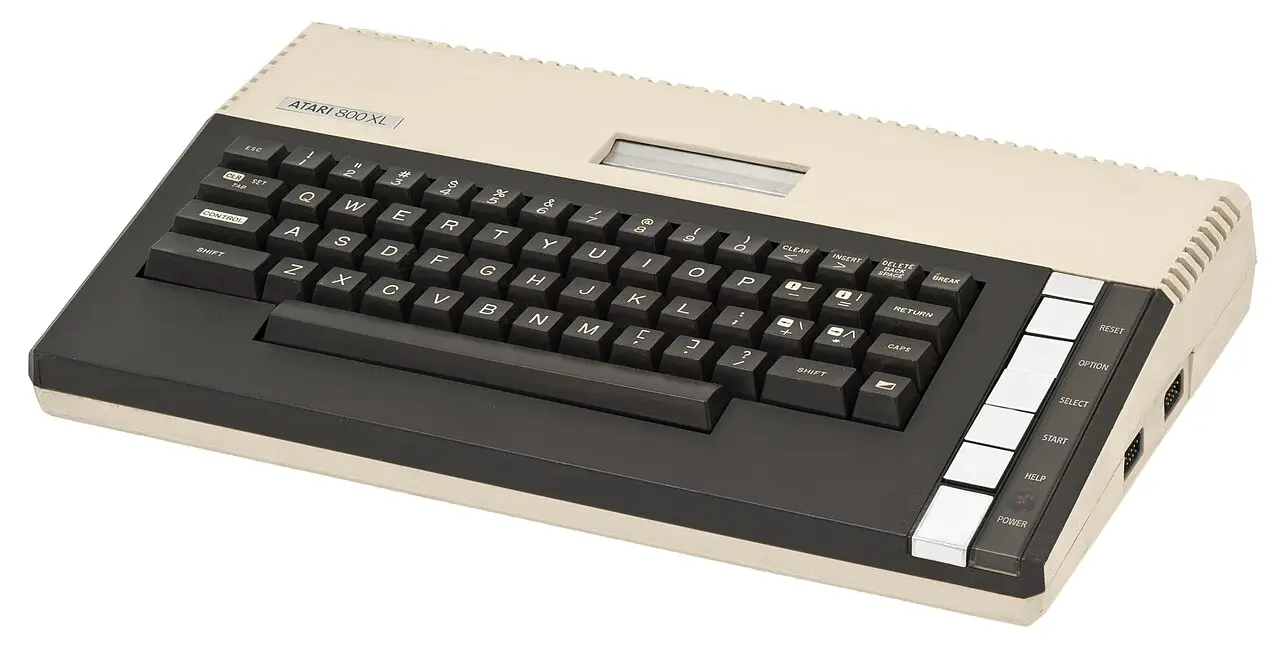
The 800XL looked more restrained than the cream Atari 800. Its broad dark panel framed a full-travel keyboard, while silver function keys formed a neat column at the right.
RESET, OPTION, SELECT and START came directly from Atari's game culture. A cartridge disappeared beneath a spring-loaded door. Two standard nine-pin joystick sockets accepted the same simple digital controllers used by the company's consoles and many other home computers.
Expansion had not been forgotten. The Parallel Bus Interface exposed the internal bus for ambitious external hardware. More important in everyday use was the existing SIO connection, which meant that many owners could keep their Atari cassette recorder, disk drive or printer.
03 / The original division of labour
Three custom chips still gave Atari its character
- 01
ANTIC builds the display
A programmable display list could combine text and graphics modes on one screen and relieve the CPU of much of the repetitive video work.
- 02
GTIA adds colour and players
It translated display data into colours selected from a 256-value palette and controlled player/missile graphics—the movable objects that made games feel immediate.
- 03
POKEY makes sound and connections
Four audio channels, keyboard scanning, timers, random numbers and serial communication came together in one versatile chip.
04 / BASIC without a cartridge
Switching on opened a programming workspace
On the earlier Atari 800, BASIC normally arrived on a cartridge. On the 600XL, 800XL and XE machines the language was built into ROM. A television and power supply were enough to reach the blue editing screen.
Commands such as GRAPHICS, COLOR, PLOT and DRAWTO exposed the visual hardware more directly than many rival BASIC dialects. Sound could be produced with SOUND. A first experiment therefore needed no mysterious memory addresses.
Atari BASIC also had limitations and idiosyncrasies, and advanced programmers soon turned to machine code, assemblers, Action! or Turbo-BASIC XL. Holding OPTION while switching on disabled the internal BASIC, which was necessary for many cartridge and disk programs that wanted the memory for themselves.
05 / Compatible—but not invisible
Old software met a revised operating system
Atari wanted XL computers to inherit the large 400/800 library. Most well-behaved programs did, because the processor, custom chips and important memory locations remained familiar.
Yet some commercial games bypassed official routines, relied on undocumented details or used copy protection tied to the older operating system. Those programs could fail on a new XL. Atari and third parties supplied translator disks that temporarily loaded an older-compatible environment into RAM.
The episode exposed both sides of compatibility. Stable hardware gave the family an unusually long life, but programmers who treated a particular machine's accidents as promises made every revision more difficult. Users learned to hold OPTION, try a translator or search for an XL-compatible edition.
06 / The intelligent chain beside the computer
SIO made peripherals feel like a family
Disk drives, cassette units, printers and modems connected through Atari's Serial Input/Output port. Devices could be daisy-chained, so one cable ran from the computer to the first box and another continued to the next.
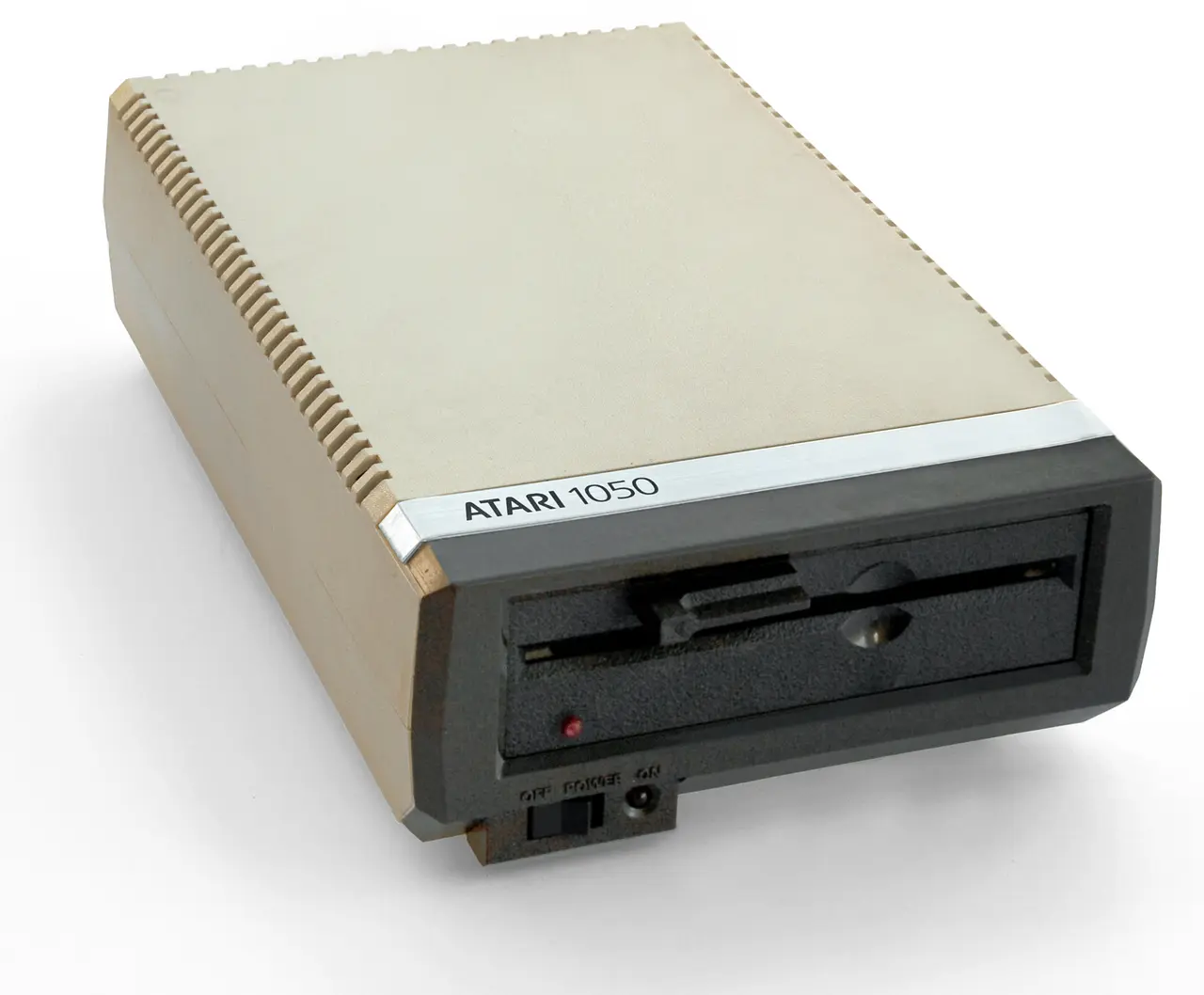
The drive matched the XL design and contained its own controller electronics. SIO identified devices by type and number.
These were “intelligent” peripherals with electronics of their own. The computer sent commands over a serial protocol instead of directly controlling every motor movement. It made the system approachable and reduced the number of incompatible sockets.
With a disk drive, Atari DOS introduced files, directories and utilities. Loading became quicker and more dependable than cassette, although the drive could cost as much as the computer. The familiar SIO bus survived every XL and XE revision.
07 / XE: more memory, a cooler suit
The 130XE pushed an 8-bit address space past 64 KB
After Jack Tramiel's company acquired Atari's consumer division in 1984, the 8-bit line received a new case visually related to the forthcoming Atari ST. The 65XE carried 64 KB; the 130XE doubled that amount.
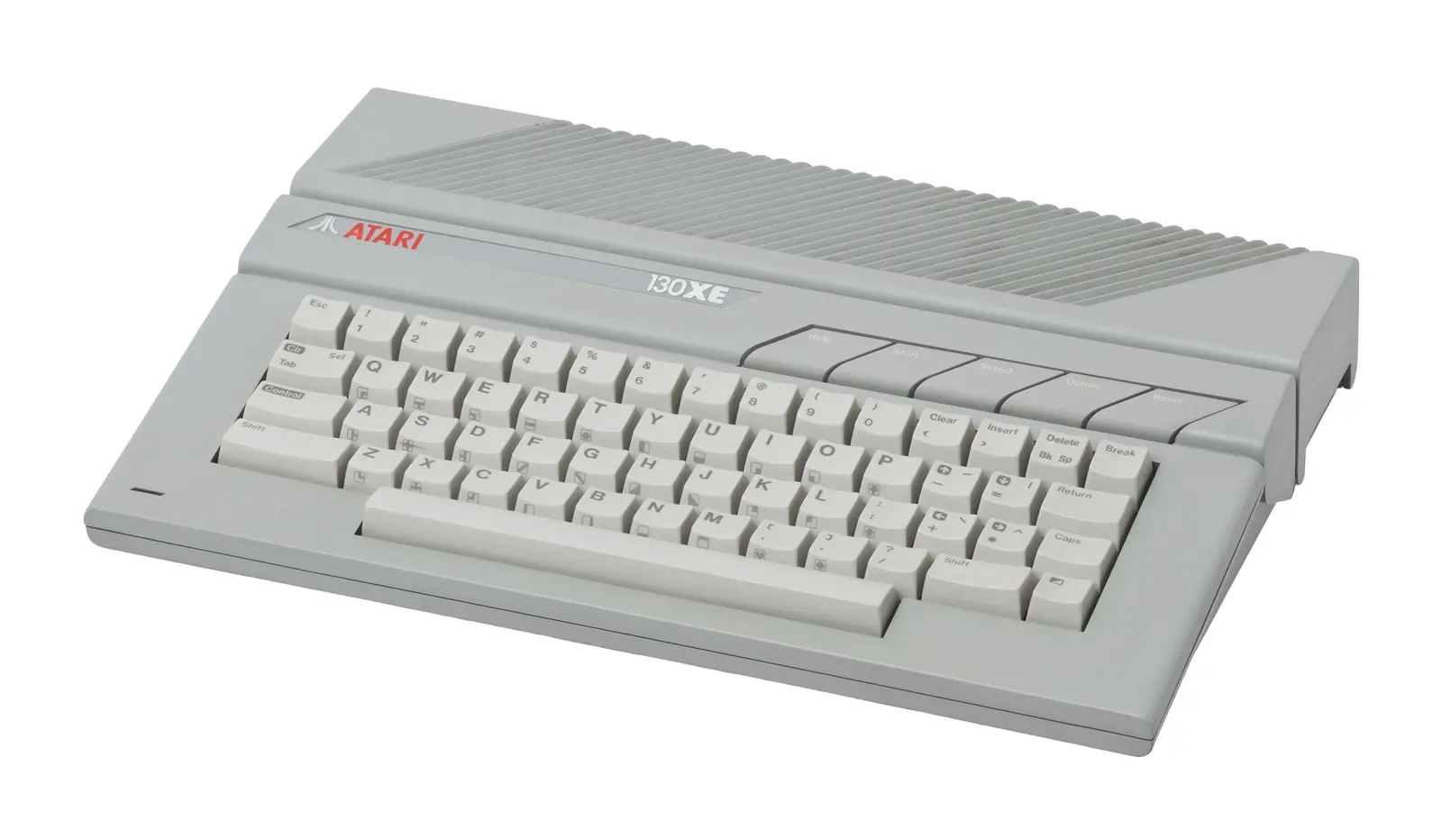
A lower grey case and red logo linked the mature 8-bit family visually to Atari's new 16-bit ST computers.
A 6502 could directly address only 64 KB. The 130XE therefore divided its extra memory into banks and switched the required section into part of the normal address space. FREDDIE helped manage access to dynamic RAM, while an enhanced memory-management unit selected the extra banks. Programs had to be written to use them; the machine did not automatically make everything twice as large.
Enhanced software could use those banks for larger data sets, graphics or a RAM disk. The smaller ECI expansion connection replaced much of the XL's wide PBI. Technically, however, XE remained recognisably Atari 8-bit: old joysticks, SIO peripherals and most existing software still belonged.
08 / A platform that refused to disappear
The case changed more often than the computer within
Atari's 8-bit architecture travelled from an expensive 1979 system to budget computers and finally a console-shaped game system.
Atari 400 and 800
ANTIC, CTIA/GTIA, POKEY and SIO establish the architecture inherited by every later model.
Atari 1200XL
A handsome but expensive transitional model introduces 64 KB, two joystick ports and a revised operating system.
600XL and 800XL
Smaller, cheaper computers add built-in BASIC; the 64KB 800XL becomes the enduring favourite.
Atari changes hands
Jack Tramiel's Atari Corporation cuts costs and prepares a new family identity.
65XE and 130XE
The same 8-bit core receives an ST-inspired case; the 130XE adds 128 KB through bank switching.
800XE and XEGS
Regional XE models and the console-styled XE Game System carry the library into new markets.
The final machines leave production
Especially in Central and Eastern Europe, XL/XE computers remain affordable, useful and actively supported.
09 / Sources & further reading
Explore further
- Atari, Inc. — Atari 800XL Owner's Guide (1983)
- Atari Computer Museum — the XL series
- Atari Computer Museum — Atari 800XL
- Atari Computer Museum — Atari 130XE
- Atari 8-Bit Computers FAQ — models, hardware and compatibility
Image credits
- Atari 800XL — Evan-Amos, CC BY-SA 3.0; resized and converted to WebP
- Atari 130XE — Evan-Amos, CC BY-SA 3.0; resized and converted to WebP
- Atari 1050 disk drive — Bilby; retouched by MagentaGreen and Maury Markowitz, CC BY 3.0; resized and converted to WebP


