Peripherals 03
Floppy disks and drives:
storage you could hear working
The floppy disk replaced waiting with seeking. Programs became files with names, directories and free space—but every click, spin and head movement still revealed the physical work behind the screen.
01 / The wait acquires an address
A disk did more than load faster: it knew where a program lived
On cassette, reaching a later program meant winding past everything before it. A disk drive moved its read/write head to a chosen track and waited for the correct sector to rotate underneath.
That change reorganised the experience of a computer. A directory could list several programs. One file could be replaced without recording the whole medium again. Games could load new areas during play, while word processors could open and revise documents by name. The drive still made the user wait, but it turned waiting into a sequence of short, purposeful searches.
02 / A disk that was genuinely flexible
The word floppy described the magnetic circle, not necessarily its case
Inside every floppy sat a thin, bendable disk coated with magnetic material. The drive spun it while a head read or changed tiny regions of magnetisation.
The 8- and 5¼-inch versions lived in soft square jackets and exposed part of the surface through an oval opening. The 3½-inch disk placed the same flexible idea inside a hard plastic shell with a sliding metal shutter. It felt sturdier and disappeared neatly into a pocket, but “hard diskette” would have missed the point: the recording medium inside still flexed.
03 / Smaller outside, more useful inside
Three sizes mark the journey from computer room to shirt pocket
IBM developed the 8-inch disk for loading control information into large systems. Shugart Associates announced a 5¼-inch drive in 1976 after Wang Laboratories asked for something smaller and cheaper. Sony's 3½-inch format later brought a rigid shell and protective shutter.
Capacity did not simply follow diameter. Improvements in media, heads, encoding and track density let smaller disks hold more. Nor did one size guarantee one capacity: single- and double-sided media, different densities and incompatible formatting schemes created a thicket of variants behind those three familiar silhouettes.
04 / First make it empty
A new disk had to be formatted before it could remember anything
Formatting laid down the structure a particular computer expected: tracks, sectors, identification marks and a directory. The process made one physical disk intelligible to one operating system.
This was a small rite of ownership. Labels were written by hand. Boxes acquired dividers for games, utilities and personal files. A notch on a 5¼-inch disk or a sliding tab on a 3½-inch disk prevented accidental writing. Some users deliberately cut a second notch so the reverse side could hold data—a practice that turned suitable single-sided disks into informal “flippies”.
05 / The drive that was another computer
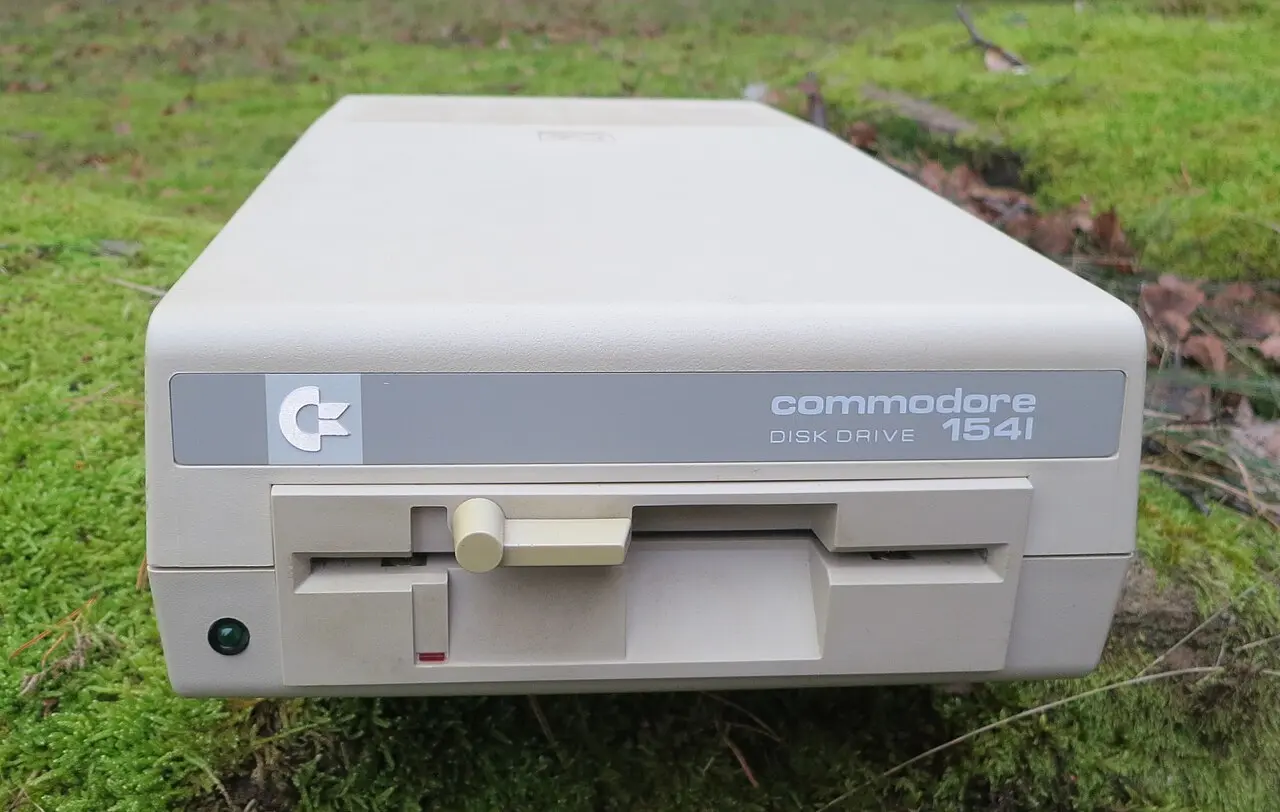
The Commodore 1541 contained its own processor, memory and disk operating system
Behind the beige front sat a 6502-family processor, 2 KB of RAM and 16 KB of ROM. The C64 sent commands over its serial connection; the drive interpreted them and managed the disk itself.
That intelligence descended from Commodore's earlier IEEE-488 disk systems, but the inexpensive serial connection became notoriously slow. The contradiction defined the 1541: unusually autonomous hardware connected through a bottleneck. Fast-loader cartridges and software routines transformed performance, and programmers eventually used the drive's processor for effects its designers had never intended.
06 / Formats divided the universal-looking disk
A disk could fit perfectly and remain completely unreadable
Manufacturers chose different numbers of tracks and sectors, different encodings, directory structures and even rotational strategies. The jacket had become a standard object; the information inside had not.
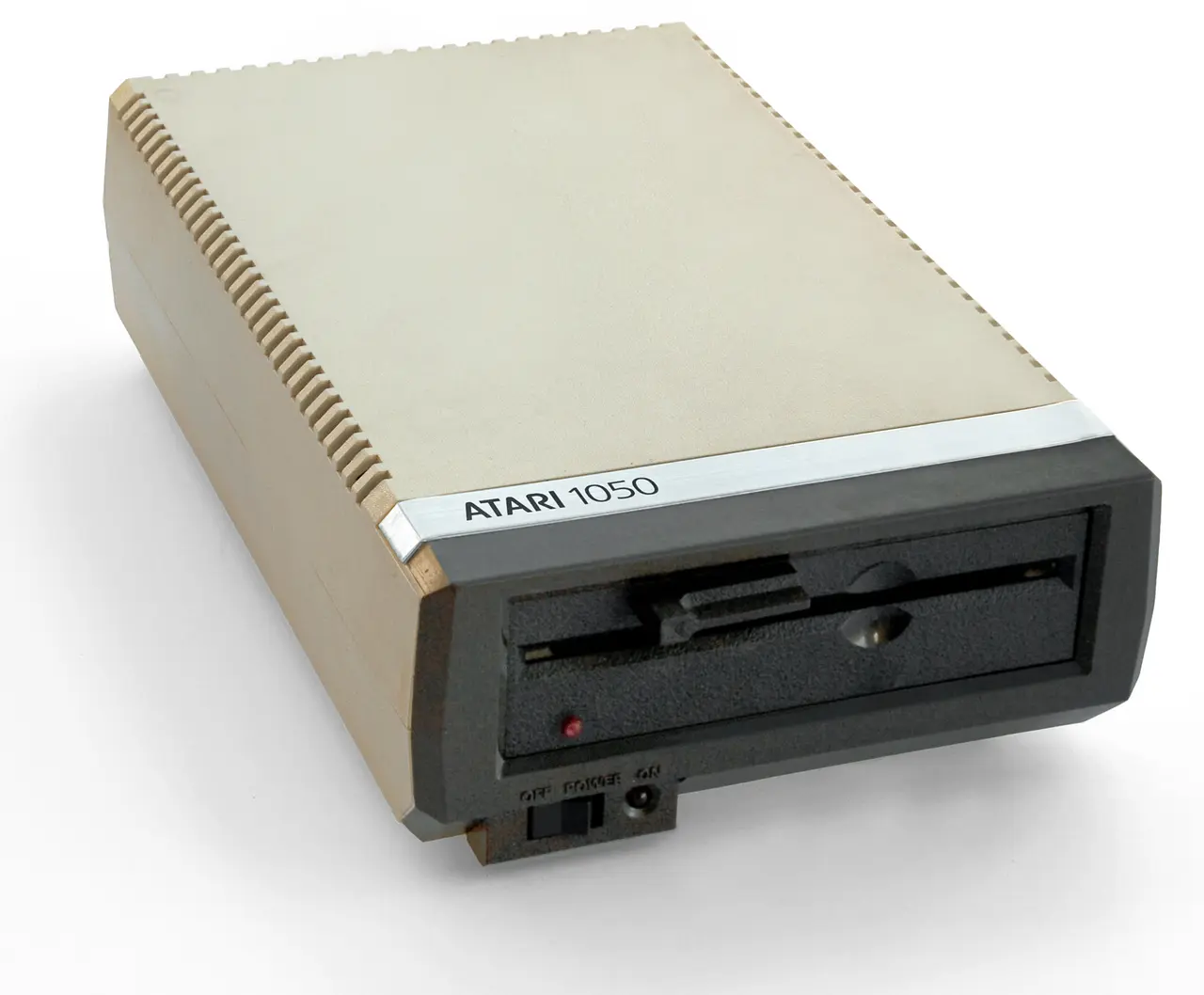
An Atari 1050 could store roughly 88 KB in its basic single-density format and about 130 KB in enhanced density. A Commodore 1541 disk held about 170 KB per side. Apple, BBC, MSX and CP/M systems made other choices. Capacity figures therefore described a complete agreement between drive and software, not a property printed permanently into the plastic.
07 / The soundtrack of direct access
The drive explained its work through motors, clicks and knocks
A motor brought the disk to speed. A stepper moved the head in discrete jumps. The latch closed with a mechanical certainty that no on-screen icon could reproduce.
Owners learned to interpret the noises. A brief chatter meant a directory search; repeated knocking could signal a read error or a loader deliberately seeking a known position. On some Commodore drives, error recovery drove the head against a physical stop to recalibrate track zero—the infamous knock that sounded destructive because it was literally mechanical impact. Disk storage felt advanced, yet never abstract.
08 / Copying becomes a social system
Disk boxes turned clubs, schools and bedrooms into software exchanges
A disk copied much faster than a cassette and could contain many separately named files. Directory listings made a collection browseable before anything was loaded.
Computer clubs exchanged public-domain programs, demos, utilities and shareware, while commercial games circulated through the same networks. With one drive, copying an entire disk could require several swaps as memory temporarily held chunks of data. Two drives made the process almost luxurious. The ease of duplication helped software spread, and also made copy protection an industry of unusual tracks, deliberate errors and custom formats.
09 / More capacity, more swapping
As programs grew, the disk became both library and stage direction
A game no longer had to fit into memory all at once. It could load a title, then a world, then music or the next scene. The disk made richer software possible while interrupting it with instructions to turn over or insert another disk.
On 16-bit computers, multi-disk games turned the desk into a choreography of labelled media. Workbench, application and document disks competed for a single drive. Hard disks eventually removed much of that movement, but disk swapping belongs to the rhythm of the Amiga and Atari ST just as strongly as cassette waiting belongs to the C64 and ZX Spectrum.
10 / Fragile, portable, recoverable
A floppy protected its data from dust, but never separated it from the physical world
Heat, dirt, fingerprints, bent jackets, worn surfaces and weakening magnetic signals could all destroy a file. The 3½-inch shutter improved protection without making the medium permanent.
Preservation now combines old drives with specialised controllers that capture more than ordinary files. Flux-level imaging records the timing of magnetic transitions, including odd formats and protection patterns. Disk images then let emulators recreate directories and loading behaviour. The plastic may fail, but its map of tracks and sectors can survive as another file.
11 / A shrinking disk
From maintenance tool to universal save icon
Each generation made the package smaller and tougher while changing what users expected storage to do.
IBM's 8-inch disk
A flexible magnetic disk enters service as a convenient way to load control information.
5¼-inch Minifloppy
Shugart Associates announces a smaller drive suited to emerging personal systems.
Apple Disk II
A cost-conscious controller helps make floppy storage central to a successful personal computer.
Sony's 3½-inch disk
A rigid shell and shutter prepare the floppy for a new generation of machines.
Commodore 1541
An intelligent 170 KB drive becomes the defining disk companion to the C64.
The save icon remains
Hard disks and optical media take over, but the diskette survives as the symbol for saving.
12 / Sources & further reading
Explore further
- Computer History Museum — 5¼- and 3½-inch drives meet personal-computer needs
- Commodore — VIC-1541 Floppy Disk Drive User's Manual
- Atari 1050 Disk Drive Service Manual
- HomeComputerMuseum — Commodore 1541-I
Image credits
Commodore 1541 — R. Henrik Nilsson, CC BY 4.0; resized and converted to WebP
Atari 1050 — Bilby; retouched by MagentaGreen and Maury Markowitz, CC BY 3.0; resized and converted to WebP
Floppy disk, access, anatomy and workflow diagrams — original editorial design

