Peripherals 01
Keyboards:
where the computer met your fingers
Before windows, icons and touchscreens, a computer introduced itself through its keys. Their shape, resistance, colour and printed commands explained the machine before the first character appeared.
01 / A machine you could touch
A home computer was often judged before it was switched on
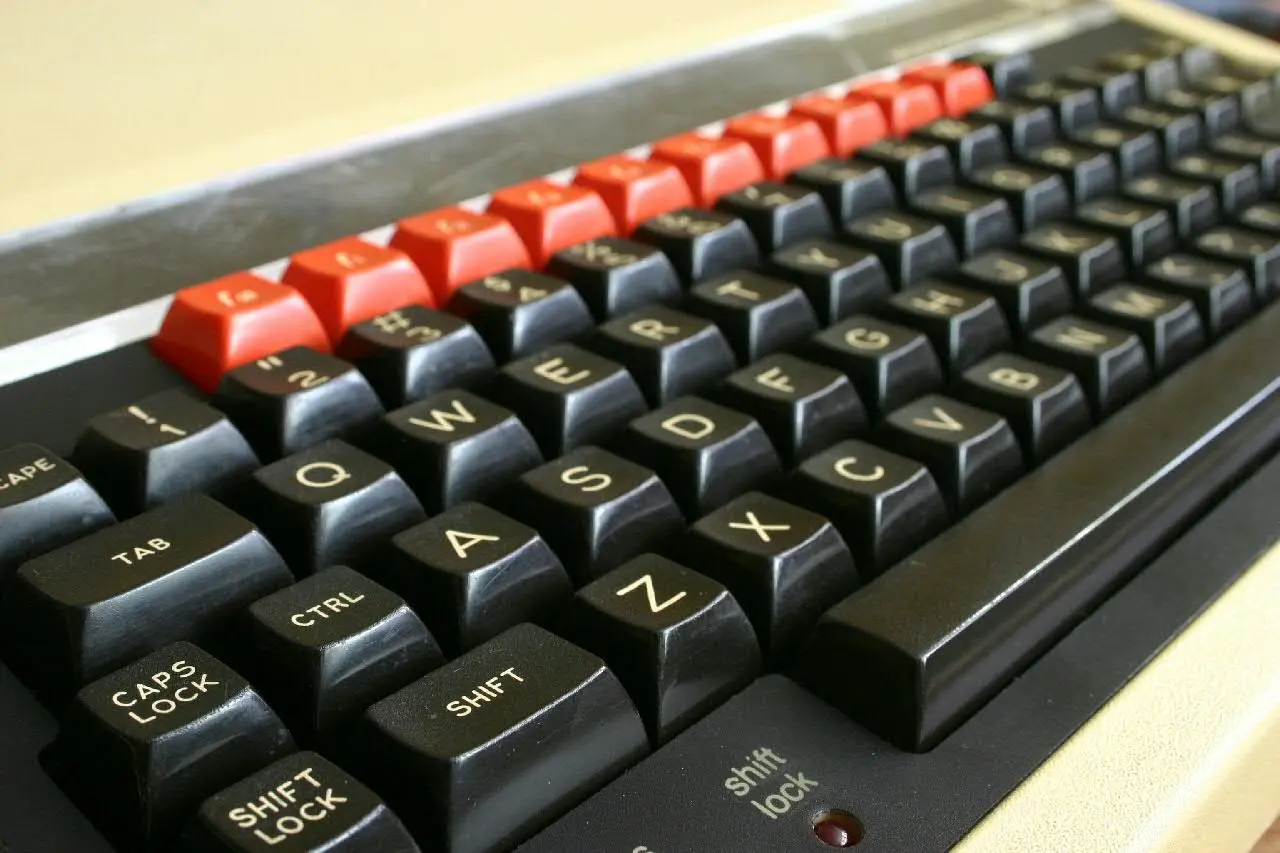
Press a key on a BBC Micro and it travels with a firm, controlled movement. Press one on a ZX81 and a printed plastic surface barely yields. Both actions enter a character, yet they suggest completely different ideas of what a computer is.
The keyboard was not merely an input device. It was the largest part of many home computers, the surface facing the owner every day and the place where cost cutting was impossible to hide. Weighty keys promised seriousness. Tiny rubber shapes signalled affordability. A forest of legends hinted at power, while a clean layout assumed that commands could be remembered.
02 / The typewriter's ghost
The computer inherited QWERTY because fingers already knew the way
Early computers were operated through switches, punched cards and teleprinters. When screens and terminals arrived, the familiar typewriter layout offered an interface that typists could approach without learning the alphabet again.
But a computer needed more than prose. It added control keys, escape, cursor movement, function keys and symbols useful in programming. Return no longer only moved to a new line; it confirmed an instruction. Shift became a gateway to characters, colours and commands. The keyboard looked familiar while quietly changing what every key could mean.
03 / The computer under the keyboard
In the home-computer era, the keyboard was also the case
The Apple II, Commodore 64, Atari 800 and BBC Micro placed processor, memory and connections beneath the keys. Setting up the computer meant putting the keyboard on a table and finding a television or monitor.
This arrangement made the machine approachable and cheap to package, but it also turned typing into a physical encounter with the entire computer. Cartridges protruded nearby, ventilation warmed the case and cables pulled from the rear. Unlike the detachable PC keyboard, this was not a replaceable accessory. Its slant, width and key feel belonged permanently to the computer's identity.
04 / Economy beneath the fingertips
A cheap keyboard could make a computer affordable—and make every saved pound tangible
A full keyboard required individual keycaps, moving parts and assembly. Manufacturers looking for a mass-market price experimented with calculators, rubber mats and flat membranes.
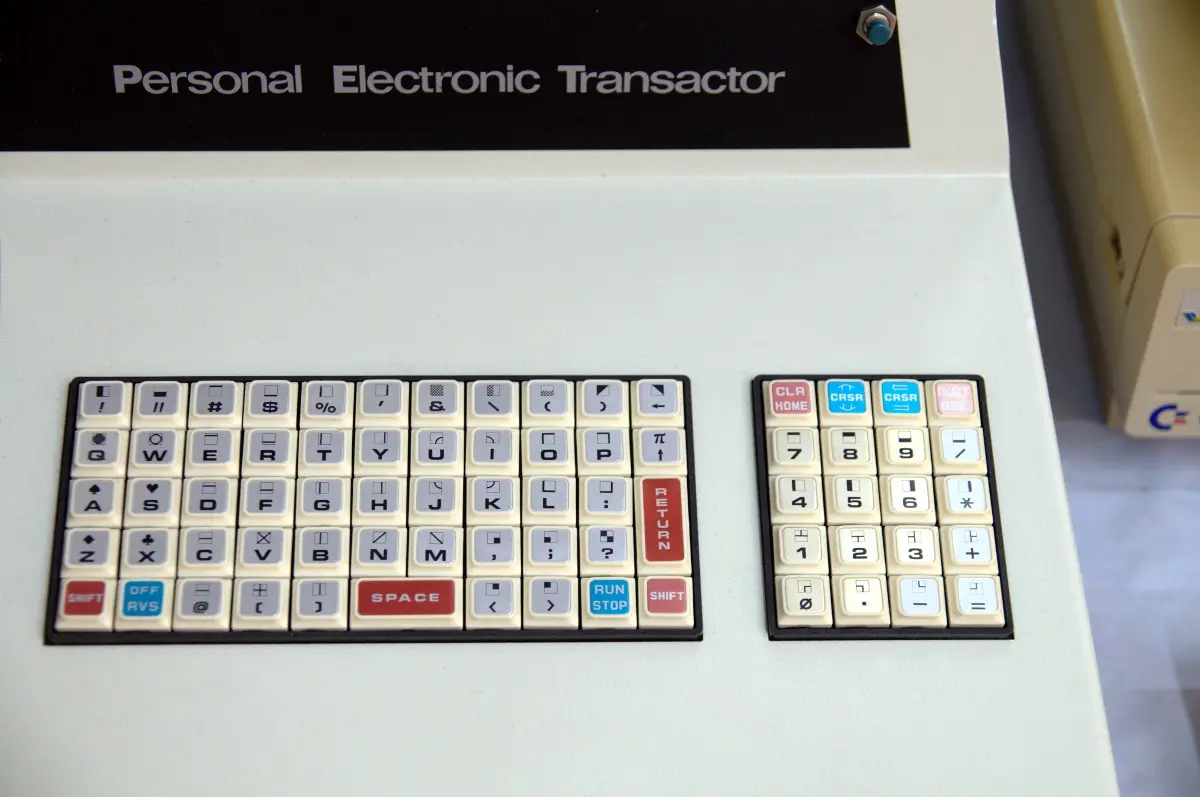
The original Commodore PET used small calculator-like chiclet keys. They suited Commodore's manufacturing experience and the machine's futuristic appearance, but were awkward for sustained typing. Sinclair went further: the ZX80 and ZX81 used a sealed membrane with no conventional key movement at all. It lowered cost and kept the case remarkably thin. It also ensured that nobody could mistake the machine for an office terminal.
05 / One key, many words
Some keyboards did not just type a program; they taught the language
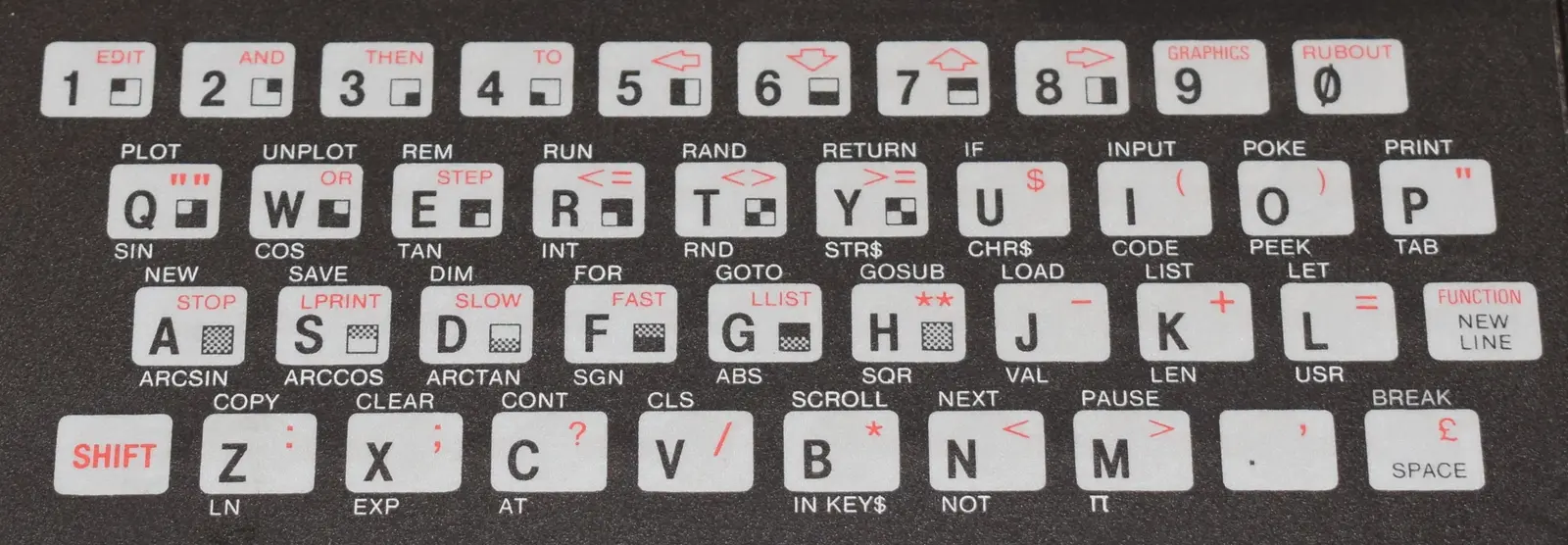
On Sinclair machines, BASIC keywords were printed around the letter keys. In the right mode, pressing a single key entered an entire instruction such as PRINT, GOTO or LOAD.
The system saved memory because a keyword could be stored as one token, and it prevented commands from being misspelled. It also created a peculiar learning curve. Beginners did not merely search for letters; they searched the keyboard for a programming vocabulary distributed across several shift states. The legends served as manual, menu and puzzle at once.
06 / Colour as instruction
Before graphical menus, manufacturers used the keyboard as a map
Red function keys on the BBC Micro formed a visible row above the black typing area. Commodore printed graphic symbols on its fronts and colours on the number keys. Atari separated console controls such as Start, Select and Option from ordinary typing.
These were not decorations added after the interface had been designed. Colour, position and typography were the interface. A manual could say “press the red key” or show a symbol already present under the owner's fingers. A crowded keyboard could look intimidating, but it made invisible capabilities physically discoverable.
07 / National characters, international machines
The same alphabet did not produce the same keyboard everywhere
British, American, German, French and Scandinavian buyers encountered different punctuation, currency signs and accented letters. Yet many imported home computers simply arrived with an American or British layout.
Dutch users commonly worked with QWERTY and often accepted that the legends on the keys did not perfectly describe every character produced by software. Localisation could live in ROM, in a word processor or on stickers rather than in new hardware. The keyboard therefore reveals how “personal” computers crossed borders: globally manufactured, locally improvised.
08 / Feel is information
A key tells the finger that an invisible electrical contact has happened
Travel, resistance, a bump or a click provide feedback before the character appears on screen. With a membrane, the eye may have to confirm the result. With a positive mechanism, the finger already knows.
Inside most keyboards, keys close positions in a matrix of rows and columns. The computer scans that matrix and translates the contact into a character or command. The electronic idea is economical; the expensive part is making hundreds of thousands of presses feel consistent. That is why the keyboard often exposed the true ambitions of a machine more clearly than its processor specification did.
09 / A keyboard can change the category
Attach the XEGS keyboard and a games console becomes an Atari computer
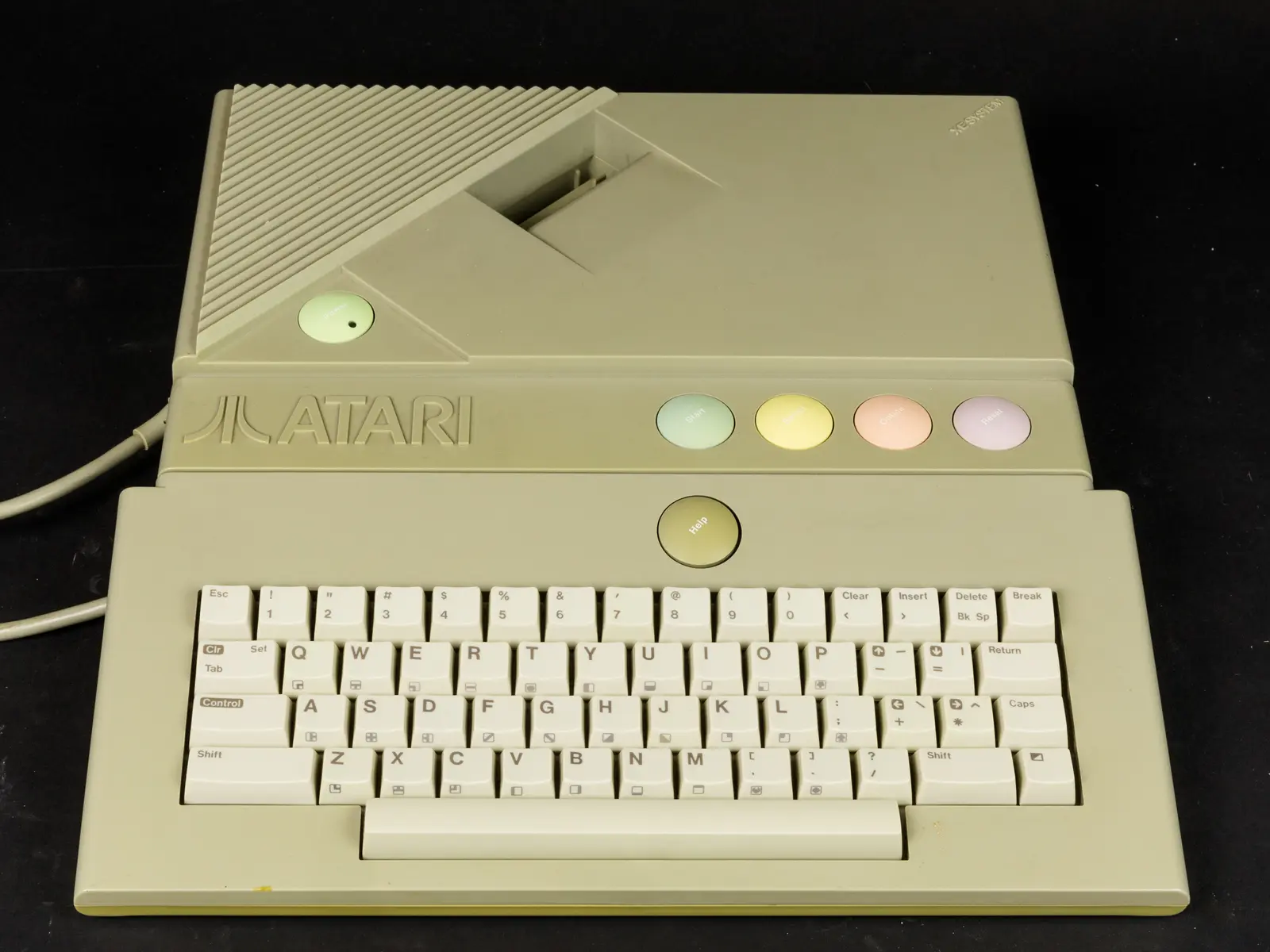
The Atari XE Game System of 1987 made the boundary unusually literal. Without its separate keyboard, the pastel-coloured unit presented itself as a cartridge console. Connect the keyboard and the familiar Atari 8-bit computer environment became accessible.
The silicon had not changed. The keyboard changed the invitation. It suggested programming, writing and general-purpose ownership instead of simply selecting a game. Other consoles offered keyboards as add-ons, but XEGS made the accessory central to its double identity: the same hardware could be sold to two imagined users.
10 / The remembered machine
Emulation preserves the characters, but rarely the act of entering them
A modern keyboard can send the same codes to a recreated Commodore 64 or ZX81. It cannot put the original key spacing, resistance, legends and posture beneath the user's hands.
This is why restored machines can trigger a memory before the screen lights up. The hollow clack of a large key, the pressure needed for a membrane and the location of Run/Stop belong to the software experience. Today's enthusiasm for mechanical keyboards recognises the same truth in a new form: typing is never only data entry. A keyboard gives an otherwise silent calculation a body, a rhythm and a voice.
11 / A short key history
From office machine to computer identity
The layout stayed recognisable while the meaning, mechanism and place of the keyboard kept changing.
QWERTY spreads
Commercial typewriters establish the letter arrangement inherited by later terminals.
Terminal era
Teleprinters and video terminals turn typing into direct computer interaction.
The computer moves underneath
Apple II, Commodore PET and TRS-80 make the keyboard part of the personal machine.
Two extremes
ZX81 offers a flat membrane while BBC Micro brings classroom-grade full-travel keys.
The PC model hardens
IBM's Model M generation helps define the detachable keyboard remembered for its decisive feel.
Feel returns
Mechanical switches, retro reproductions and restored computers make touch important again.
12 / Sources & further reading
Explore further
- Commodore — PET 2001-8 Personal Computer User Manual (1978)
- Sinclair Research — ZX81 BASIC Programming
- Acorn/BBC — original BBC Micro user guides
- Atari — XE System Keyboard Owner’s Manual (1987)
- Smithsonian National Museum of American History — Commodore PET 2001
Image credits
BBC Micro keyboard — Barney Livingston, CC BY-SA 2.0; converted to WebP
PET keyboard — Soupmeister, CC BY-SA 2.0; resized and converted to WebP
ZX81 keyboard — Piergiovanna Grossi, CC BY-SA 4.0; resized and converted to WebP
XEGS with keyboard — Raimond Spekking, CC BY-SA 4.0; resized and converted to WebP
Keyboard diagrams — original editorial design


