Technology / Chapter 09
Why did 8 bits and 16 bits matter?
The numbers appeared in large type on boxes and advertisements. They seemed to sum up an entire generation of computers and consoles. But what exactly was being counted?
01 / A number on the case
A simple name for a complicated machine
During the 1980s, moving from 8 to 16 bits felt like crossing from a toy to a ‘real’ computer.
The Commodore 64, ZX Spectrum, MSX and Atari 8-bit computers belonged to one world. The Amiga, Atari ST and Macintosh belonged to the next. Consoles were divided into generations too: the NES was 8-bit; the Mega Drive and Super Nintendo were 16-bit. The number became a badge of quality.
Yet a computer had no single, central bit value. Its processor handled data at one width while using an address bus, data bus and registers that were not always equally wide. Graphics and sound chips followed rules of their own. ‘8-bit’ was therefore a technical description, a convenient nickname and a marketing term all at once.
02 / Start with the smallest piece
A bit is a zero or a one
More bits allow a processor to handle larger patterns of zeroes and ones in one operation.
Eight bits form one byte. Eight switches that can each be off or on produce 28, or 256, possible combinations. Sixteen bits produce 216, or 65,536 combinations. That is not twice as many but 256 times as many.
This mattered for calculations. An 8-bit processor could certainly work with larger numbers, but had to divide them across several bytes and process them in stages. A 16-bit processor could perform much of that work using wider registers and instructions. Coordinates, memory addresses and calculations could consequently be handled more efficiently.
03 / The 8-bit workbench
Why the Commodore 64 was an 8-bit computer
Its 6510 processor moved data eight bits at a time, while its address bus was sixteen bits wide.
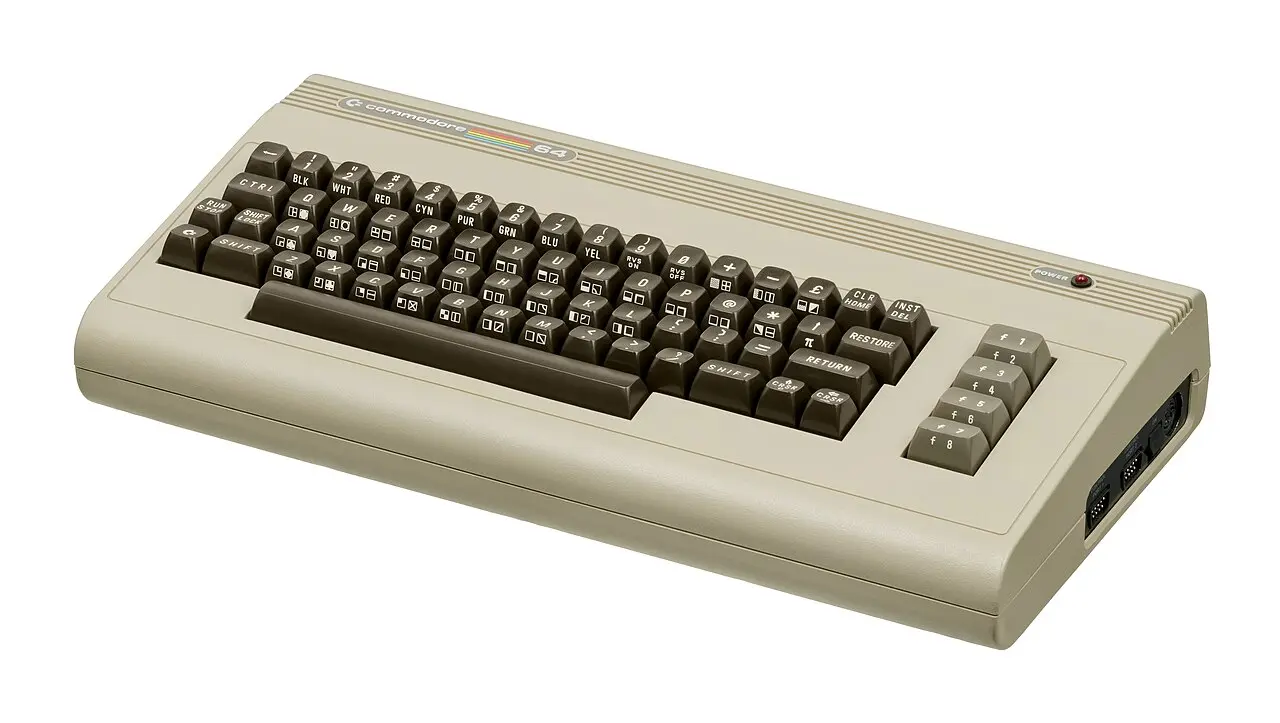
The eight data lines determined how much information the processor could read or write in one transfer. Sixteen address lines allowed it to select 65,536 memory locations: 64 KB. That is why many classic 8-bit computers could not pass this boundary without using tricks.
This did not make the entire machine ‘eight bits wide’. Its VIC-II video chip and SID sound chip handled specialised work. A Commodore 64 could therefore outperform a computer with a faster processor but simpler graphics or sound hardware in particular tasks.
04 / The 16-bit leap
Larger programs, larger worlds
The Motorola 68000 gave the Amiga, Atari ST and Macintosh far more room for calculations and memory.

The 68000 immediately demonstrates why the labels were never perfect. It had a 16-bit external data bus, 32-bit registers and a 24-bit address bus. It could directly address 16 MB—256 times the range available through a simple 16-bit address space.
That capacity made larger programs, richer operating systems and more data in memory practical. Windows, icons, audio samples, paint programs and more extensive game worlds became feasible. Again, the processor did not create the experience alone: the Amiga added remarkable graphics and sound chips, while the Atari ST and Macintosh made different choices.
05 / Machines that escaped the box
Was the IBM PC 8-bit or 16-bit?
The Intel 8088 in the first IBM PC had a 16-bit architecture but communicated with the outside world through an 8-bit data bus.
16-bit address
16-bit internal
32-bit registers
Intel described the 8088 as a processor with a 16-bit internal architecture and an 8-bit bus interface. The narrow bus allowed less expensive motherboards and support chips, although each transfer of a 16-bit word required two steps. The processor nevertheless ran the same 16-bit instruction set as the 8086.
Consoles were mixtures too. The Mega Drive combined a Motorola 68000 with an 8-bit Z80 for sound and compatibility. The Super Nintendo used a processor capable of working in both 8- and 16-bit modes. A generation label remained useful as long as nobody mistook it for a complete blueprint.
06 / Graphics and sound counted differently
More processor bits did not automatically mean more colours
Colour counts, sprites and sound channels were mainly determined by separate chips, memory and bandwidth.
One 8-bit computer might display sixteen colours while another showed two, 256 or—with restrictions—even more. The 16-bit processor inside an Atari ST did not draw colourful images by itself. That required video hardware, display memory and software. The Amiga could scroll and play sound more impressively with the same main processor because its custom chips took over much of the work.
Terms such as 8-bit colour and 16-bit colour mean something else again. They describe how many bits store the colour of a pixel, not the width of the processor. A 16-bit computer could have a monochrome screen; an 8-bit computer could show a colourful game. Context decides what the number tells you.
07 / What the user noticed
The leap was real, but it arrived as a package
Several improvements came together during the transition to 16-bit machines.
- often 16 to 64 KB of RAM
- cassette and simple disk drives
- BASIC immediately after startup
- small, tightly optimised games
- hundreds of kilobytes to megabytes
- faster disks and hard drives
- windows, mice and multitasking
- larger images, music and game worlds
New processors arrived alongside cheaper RAM, better storage, higher clock speeds and new graphics chips. As a result, 16-bit machines felt not only faster but roomier. They could keep more software in memory, run more complex interfaces and handle much larger files.
Not every 16-bit machine beat every 8-bit machine in every respect. An ingenious programmer and strong custom chips could reverse the order. Bit width described an important component; the experience came from the complete system.
08 / The verdict
So: what did those bits matter?
They determined how much data the processor naturally handled at once. This affected calculations, memory and the scale of software. The move from 8 to 16 bits was therefore technically important.
- PROCESSORWider operations
Larger numbers and addresses required fewer intermediate steps.
- MEMORYMore room
New address buses made much larger memory ranges usable.
- SOFTWAREMore ambition
Larger games, graphical interfaces and creative tools became viable.
- HARDWAREThe system decided
Video, audio, speed and design remained at least as important.
‘8-bit’ and ‘16-bit’ were therefore not inventions, but neither were they report marks. They were useful shorthand for two eras in which far more changed than the width of a processor.
09 / Sources & images
Explore further
- MOS Technology — 6510 Microprocessor with I/O, datasheet (1982)
- Motorola / NXP — M68000 Family Programmer’s Reference Manual
- Intel — iAPX 86/88 User’s Manual, Hardware Reference
- Commodore 64 Programmer’s Reference Guide
Image credits
- Binary illustrations and technical diagrams — original work for Silicon & Joysticks
- Commodore 64 — Evan-Amos, public domain
- Atari 520ST — Felix Winkelnkemper, CC BY-SA 4.0

